


Understanding how users arrive on your website is one of the foundations of effective digital marketing. While many analytics platforms provide high-level traffic data, marketers often need more granular insight into which campaigns, platforms, and tactics are actually driving results. This is where UTM tracking becomes essential. Drawing directly from an expert discussion with Michael Thompson, our Head of Data and Analytics, this article explains what UTM parameters are, why they matter, and how they should be implemented and analysed in GA4.
TLDR: UTM parameters are tracking tags added to URLs to help Google Analytics (GA4) accurately identify where website traffic comes from. They are primarily used for paid marketing, email, social media, and partner campaigns rather than organic channels like SEO. When set up consistently and aligned with Google’s channel definitions, UTMs allow marketers to measure campaign performance, revenue, and return on investment. Poor or inconsistent UTM usage can result in traffic being misclassified as Referral, Other, or Unassigned, reducing the reliability of reporting.
Table of Contents
What are UTM parameters?
UTM parameters are predefined query strings that are appended to the end of a URL. Their purpose is to provide additional information to Google Analytics about how a user arrived at a website. Rather than tracking all traffic universally, UTMs are mainly used to identify traffic driven by deliberate marketing activity, such as paid advertising, email campaigns, or social media promotions.
They are not suitable for every channel. For example, organic search traffic from SEO cannot realistically use UTM parameters because marketers cannot add tracking tags to search engine result pages. As a result, UTMs are typically reserved for campaigns where the marketer has full control over the destination URL.
UTM parameters work by passing structured information into Google Analytics, allowing traffic to be categorised by source, medium, and campaign. While there are five standard UTM parameters available, most tracking strategies rely primarily on three core values. The source identifies where the traffic originated, such as Google, Bing, Facebook, or an email platform. The medium explains how that traffic arrived, for example through paid search, paid social, or email. The campaign parameter then ties the visit to a specific marketing initiative or promotion.
Two additional parameters, term and content, are optional and tend to be used for more granular detail. These may represent keywords, ad groups, creative variations, or message testing, depending on the platform and strategy. Importantly, UTM tracking does not require all five parameters to function; it remains valid as long as the key parameters are present.
More recently, GA4 has introduced additional parameters such as campaign ID, which can be particularly useful when campaign names change over time. Because IDs remainconsistent, they allow for more reliable historical analysis and easier data imports into Google Analytics.
Why use UTM tracking?
The primary reason for using UTM tracking is to understand return on investment. While marketers often focus on high-level metrics such as cost per acquisition or return on ad spend, all of these calculations ultimately depend on knowing how users reached the website in the first place. UTMs provide the data that connects marketing activity to on-site behaviour, conversions, and revenue.
Without UTM parameters, Google Analytics has limited information to work with. Traffic from paid social platforms such as Facebook may be grouped under generic social channels, making it difficult to distinguish paid campaigns from organic activity. In some cases, traffic may even be attributed to Referral, Other, or Unassigned, which significantly reduces reporting accuracy.
Google Ads operates slightly differently because it uses its own auto-tagging system rather than traditional UTMs. Since Google Ads and Google Analytics are designed to work together, manual UTM tagging is not required in the same way. However, for most other platforms, including Meta, email tools, and affiliates, UTMs remain essential for proper attribution and performance measurement.
Ultimately, UTM tracking ensures that marketing decisions are based on reliable data rather than assumptions. Without it, marketers are left guessing which channels and campaigns are actually delivering value.
How to set up UTM tags
The first step in setting up UTM tracking is identifying the correct landing page. Before any parameters are added, marketers need to be clear about where users are being sent. One of the most common technical mistakes occurs at this stage, particularly around URL formatting. UTM parameters begin with a question mark, but if the landing page URL already containsone, the parameters must instead be appended using an ampersand. This often happens when links include search filters or internal query strings, and misunderstanding this detail can break tracking entirely.
Once the landing page is confirmed, the next priority is defining the source and medium. These two parameters are critical because they determine how traffic is categorised within Google Analytics. Google provides predefined rules that map sources and mediums into default channel groupings, and following these rules wherever possible simplifies reporting in the long term. Aligning UTMs with Google’s definitions reduces the need for custom channel configurations and makes reports easier to interpret. More on this can be found here.
The campaign parameter is then used to identify the specific marketing initiative. On platforms such as Meta Ads, dynamic parameters can be used to automatically populate campaign names. This approach allows marketers to apply a single UTM template across multiple campaigns, reducing manual effort and the risk of inconsistency. Meta offers a range of dynamic parameters for UTM tracking; more are available here.
Example of Meta Dynamic Campaign UTM Tracking
https://www.example.com?utm_source=facebook&utm_medium=paidsocial&utm_campaign={{campaign.name}}
How to track UTM parameters in Google Analytics
Once UTM parameters are live, GA4 provides several ways to analyse the data. The most common entry point is the Acquisition reports, which offer predefined views showing traffic by source, medium, and campaign. These reports are often sufficient for high-level performance analysis and ongoing monitoring.
For more advanced use cases, GA4’s Explore section allows marketers to build custom reports using specific dimensions and metrics. This provides greater flexibility and enables deeper analysis of campaign performance. Within these reports, it is important to understand the distinction between session-based and first-user dimensions. Session-based dimensions show where users came from during a particular visit, while first-user dimensions focus on how users originally discovered the site.
GA4 also includes attribution reporting, which shifts the focus from sessions to conversions and revenue. Attribution analysis recognises that users often interact with multiple channels before converting, and it distributes conversion value across those touchpoints. While attribution can become complex, it is still fundamentally reliant on accurate UTM data to function correctly.
Best practices for UTM tagging
Consistency is the most important principle when implementing UTM tracking. One of the simplest yet most impactful practices is using lowercase characters for all parameters. Google Analytics treats variations in capitalisation as separate values, which can quickly fragment data and complicate reporting.
Spaces should also be avoided entirely. Instead, hyphens or underscores should be used to separate words. This improves readability and prevents errors in tracking and analysis.Where possible, special characters should not be used, as this results in URL encoding, making it less readable. For example, “@” will be encoded to “%40” and so a URL would look like the following:
https://www.example.com?utm_source=facebook&utm_medium=paidsocial&utm_campaign=campaign%40modo25
Following Google’s default channel mapping rules wherever possible is another key best practice, as it ensures that traffic is categorised in a predictable and standardised way.
Equally important is alignment across teams. When multiple people or agencies are responsible for different marketing channels, inconsistent UTM usage can undermine the entire analytics setup. Agreeing on a shared UTM framework or cheat sheet helps ensure that everyone applies the same logic, whether they are managing paid search, paid social, email, or affiliate campaigns.
What if parameters begin with a ?
There is also a technical detail that frequently causes tracking issues and is often overlooked. UTM parameters normally begin with a question mark, which signals the start of tracking parameters in a URL. However, if a landing page URL already contains a question mark, commonly due to internal search queries or filters. UTM parameters must instead begin with an ampersand. Failing to make this change can break tracking or cause parameters to be ignored altogether, making it a critical check before launching any campaign.
Example of this
No “?” used in the URL
https://www.example.com?utm_source=facebook&utm_medium=paidsocial
“?” is used in the URL
https://www.example.com?search=test&utm_source=facebook&utm_medium=paidsocial
Finally, it is worth approaching Google’s own documentation examples with caution. While technically correct, some examples prioritise simplicity over best practice. For instance, using “newsletter” as a source may obscure where the traffic actually originated if emails are sent from multiple platforms. Treating the source as the system sending the traffic and using other parameters for content or messaging often results in clearer, more useful data.
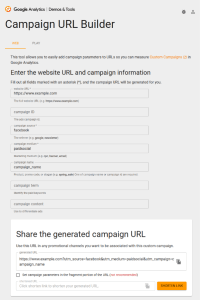
A great online tool that can help ensure UTM tracking is set up correctly is the “Campaign URL Builder” found here. In the following screenshot, you can see input fields for each of the different utm parameters. Once you start filling this out, it generates a URL with UTM tracking enabled.
Final thoughts
UTM tracking is a simple concept, but it requires discipline to implement correctly. Small inconsistencies in naming, structure, or formatting can lead to misattributed traffic, unreliable revenue reporting, and poor decision-making. When implemented with care, however, UTM parameters provide a powerful foundation for understanding marketing performance.
By maintaining consistency, aligning with GA4’s default rules, and using automation where available. Marketers can turn UTM tracking into a reliable source of insight. If you have any questions about GA4 or would simply like to know more about the platform, just get in touch with us at team@modo25.com and we’ll be more than happy to help.