


TLDR: Website migrations are a critical moment for any business with an online presence, but if not handled properly, search visibility and organic traffic can suffer. This guide breaks down what an SEO website migration is, the types you might undertake, and a comprehensive step-by-step checklist to protect and grow your organic performance.
Table of Contents
What is an SEO website migration?
An SEO website migration refers to any structural change to a website that can impact how search engines index and rank its content. This can include redesigning the site, changing the domain, consolidating multiple sites into one, updating the URL structure, or moving to a new content management system (CMS). Without proper planning, migrations can lead to drops in organic traffic, broken links, and reduced rankings, but with an SEO-focused approach, they offer an opportunity to improve visibility, user experience, and performance.
Types of website migrations
Website migrations can take several forms. Common types include:
- Domain migrations: Changing your primary domain, such as from example.co.uk to example.com.
- Protocol migrations: Switching from HTTP to HTTPS for improved security.
- CMS migrations: Moving to a new content management system.
- Site redesigns: Visual and structural redesigns that impact site hierarchy.
- Content migrations: Consolidating or reorganising existing content across pages.
- Multi-site consolidation: Merging more than one website into a single platform.
Each type brings unique SEO challenges and must be supported by tactical planning to prevent performance regression.
SEO migration checklist
Below is a detailed checklist of SEO actions to take before, during, and after your migration, designed to protect and enhance search visibility.
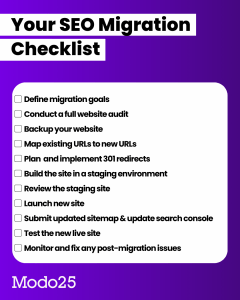
Define migration goals
Clearly articulate what the migration aims to achieve. Is it a better user experience, consolidating multiple brands, improving mobile performance, or boosting conversions? Setting measurable KPIs, such as organic traffic targets or conversion uplifts, provides a benchmark for success and keeps technical teams aligned.
Conduct a full website audit
Before you touch a single live page, conduct an in-depth audit of your existing site. This should cover:
- Crawlability and indexability issues
- Organic traffic and top-performing pages
- Backlink profiles
- Technical SEO errors like duplicate titles or broken links
Understanding the current health and performance baseline ensures nothing important gets lost in the process.
Backup your website
Always create complete backups of your site, databases, configurations, and content. This safety net protects against accidental data loss and gives your team peace of mind when making sweeping changes.
Map existing URLs to new URLs
One of the most critical steps is creating a URL mapping document. This involves listing every current URL alongside its intended new version. This map becomes the foundation for redirects and ensures valuable link equity isn’t lost.
Plan 301 redirects
Once URLs are mapped, implement 301 redirects from old URLs to their new counterparts. These signal to search engines that content has permanently moved and pass ranking signals to the new pages. A thoughtful redirect strategy is essential to minimise traffic loss and preserve SEO value.
Build the site in a staging environment
Before launch, the new site should be built in a secure staging environment that mirrors how the live site will function.
Provide developers with audit findings, URL mappings, and technical requirements so known SEO issues are fixed before launch, not carried over. The staging site allows teams to validate structure, content, and functionality without risk to live performance.
Review the staging site
Thoroughly review the staging site against the original audit and migration documentation. This should include:
- Testing redirects and URL behaviour
- Identifying broken links and 404 errors
- Reviewing internal linking structure
- Checking page speed, mobile usability, and overall functionality
Any issues identified at this stage should be resolved before launch approval is given.
Launch the new site
Once testing is complete and stakeholders approve, deploy the new site, ideally during a low-traffic period.
Coordinate closely with developers so any immediate technical issues can be resolved quickly. Ensure analytics platforms, tag managers, and tracking scripts are correctly implemented from day one.
Submit updated sitemap & update Google Search Console
After launch, submit the updated XML sitemap to search engines and update site settings in platforms such as Google Search Console and Bing Webmaster Tools.
These steps help search engines discover, crawl, and index the new site structure more efficiently, reducing the time it takes for rankings to stabilise.
Test the live site (Technical & content audit)
Once live, re-audit the site to confirm everything works as expected. Check:
- Metadata, canonical tags, and structured data
- Internal links and navigation paths
- Robots.txt and indexation settings
- Content accuracy and formatting
- Page speed and mobile performance
Confirm that no pages have been accidentally set to “noindex” and that redirects behave correctly.
Monitor & fix post-migration issues
Migration doesn’t end at launch. Closely monitor performance in the weeks and months that follow. Watch for:
- Traffic fluctuations
- Keyword ranking changes
- Crawl errors and 404 pages
- Indexing or coverage issues
Some volatility is normal, especially when URLs or domains change, but a proactive monitoring approach allows teams to resolve problems early and stabilise performance faster.
Our SEO migration case study: Great Rail Journeys
A compelling example of strategic website migration is the project delivered for Great Rail Journeys. The business consolidated two separate websites into one unified platform to deliver a seamless user experience without sacrificing SEO performance. Modo25 provided a comprehensive migration strategy encompassing SEO, conversion rate optimisation (CRO), and A/B testing.
Following the migration, the results were highly positive:
- 146% year-on-year increase in sessions shortly after launch.
- 37–38% year-on-year revenue growth within 30 days post-migration.
- 16% uplift in organic clicks and impressions.
- 11% increase in ranking keywords (over 57,000 ranked terms).
- Keyword positions improved by 0.9 points on average.
This case demonstrates that, when executed with targeted SEO planning and monitoring, migrations can produce substantial gains rather than losses.
Conclusion
Website migrations are complex technical and strategic projects, but with the right checklist and planning framework, they can be executed successfully without harming SEO performance. From initial audits and URL mapping to post-launch monitoring and refining, each step safeguards search visibility and builds a stronger digital presence. Whether you’reconsolidating sites, redesigning for performance, or migrating to a new CMS, this checklist equips you with the essential actions to make your SEO migration a success.